SPSathyasiddha Pattanaik Try the prototype
01Case studyAug to Sep 2026

I built an AI assistant that makes employee benefits easier to use.

A conversational layer over WorkPerks that helps employees discover, understand and act on their benefits, designed and built end to end.

Role
Product designer, end to end
Built with
Claude Code · Next.js · Node · Gemini
Timeline
Three weeks, Aug to Sep 2026
02What I built

An assistant inside a corporate benefits app.

It finds what the company offers, explains what a benefit covers, reads what an employee already holds, and takes them to the screen where they act.

  1. BenefitsWhat can I get?
  2. BalancesHow many coins do I have?
  3. PolicyWhat is flexi?
  4. HoldingsShow me my orders.
  5. VouchersCan I get a voucher?

The prototype’s own tools and renderer, running in this page.

03Why I built it

The problem wasn’t a lack of benefits. It was the effort required to use them.

Thirty-five benefits across ten catalogues, each with its own vendors and rules, plus flexi benefits, Reward rupees, Health Coins and which wallet pays. To book or buy anything, an employee first had to find the right benefit, then work out how it is funded.

Benefits
35
Catalogues
10
Currencies
3

The usual wayWith the assistant

Employees don’t think in navigation structures. They think in questions.

Need · Search · Navigate · Understand · Check eligibility · Find benefit · Redeem

  1. Need
  2. Search
  3. Navigate
  4. UnderstandAsk
  5. Check eligibility
  6. Find benefitUnderstand
  7. RedeemAct

Every one of these lives somewhere different in the app.In the assistant, they all start in the same place.

04Conversational design

I didn’t just design the chat interface. I designed how users communicate with the product.

Routing here is the app’s keyword layer; in the app, the AI does that step.

  1. Intent · 01

    “How much do I have left?”

    “Left” fits rupees and Health Coins alike, and the balance tool refuses to guess. A product rule: rupees and coins never appear in the same answer. So the question comes back as a choice, one chip per balance, and it names flexi, the third balance, which it can explain but can’t total.

  2. Context · 02

    “How many coins do I have?”

    Each follow-up is written as a complete question, so it works on its own. The AI sees the employee’s earlier questions, never its own earlier answers: those are built from balances and orders.

  3. Action · 03

    “Can you cancel my gym booking?”

    It understood. Booking, buying and cancelling tools were never written, so it names exactly what it can’t do, and ends on the screen where cancelling happens, not on a no.

  4. Structure · 04

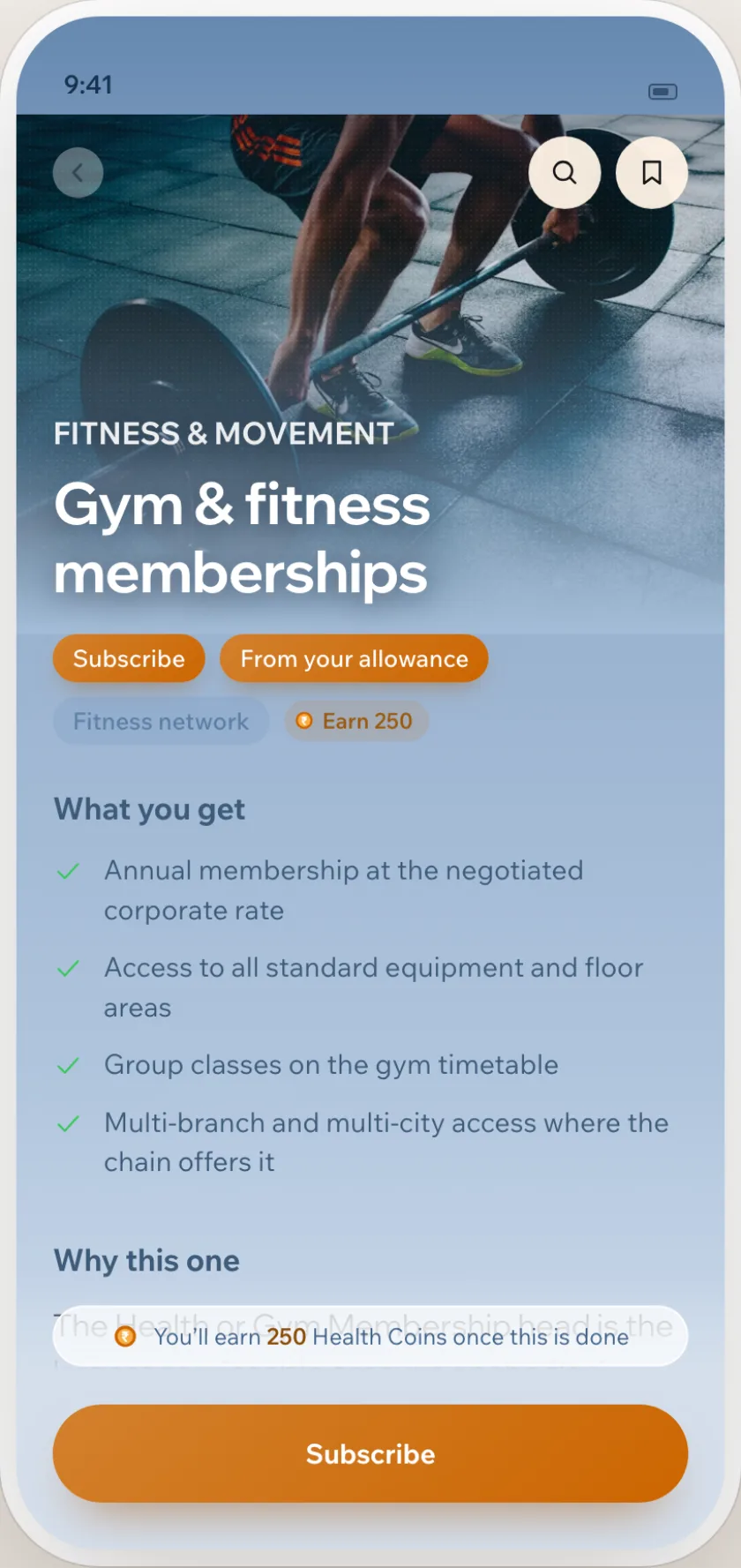
    “Tell me about Gym & fitness memberships”

    One line answers. Rows carry what it costs, how it’s paid for and who provides it, so no phrasing can drop a figure. The button opens the benefit’s own screen, where subscribing happens.
Different words, one intent

People don’t ask the same way twice.

Each phrasing in turn, routed live by the app’s keyword backup in this page. In the app the AI reads the question first, and handles the harder case: a situation, with no product named.

    get_balance currency: coins

    2,750 coins

    Same intent, same tool, same answer.

    get_balance currency: ?

    “Which balance do you mean?”

    No currency named, so it asks rather than guess.

    Situations, not product names · recorded routes

    1. cough that won’t go away, don’t want a waiting roomDoctor consultationsRight
    2. trying to give up cigarettes for monthsHealth programmes & assessmentsRight
    3. tablets every day for my blood pressurePharmacy & medical suppliesRight
    4. sleeping badly, running on emptyDigital challengesWrong → Employee Assistance Programme

    The benefit each answer led with, in one recorded run.

    What the application decides

    It understands
    Questions about benefits, balances, orders, gift vouchers and the app itself.
    It can
    Find, explain, read what you hold, and open the screen where you act.
    It cannot
    Book, buy, cancel or change a declaration. Those tools were never written.
    It never
    Shows a full voucher code, adds rupees to coins, invents an address, or answers from memory.

    When it can’t help, it still offers a way on

    Doesn’t understand

    Benefit isn’t switched on

    Clarity over AI-sounding language

    Three answers I rewrote.

    Each is recorded in the code, with the question that exposed it.

    1. hi

      I didn’t quite follow that.

      I can find a benefit, explain one, tell you what you’ve booked, your balance, or anything about gift vouchers.

      What can I get?What have I booked?What vouchers do I have?

      A greeting isn’t a misunderstanding, and that was the first line of the conversation.

    2. how do I claim this back

      I can’t do claiming expenses back myself. I can explain anything and take you to where it happens.

      No button followed.

      When there’s no screen to offer

      I can’t do claiming expenses back myself, and there is no screen in this app for it. I can explain how it works, or find you something else.

      It promised a screen it couldn’t show. Now the promise only comes with a button, and without one it says so.

    3. can I get a Bata voucher

      You can purchase a Bata voucher, which is redeemable in store only. Your voucher code will be masked once you complete the…

      No price, value or discount.

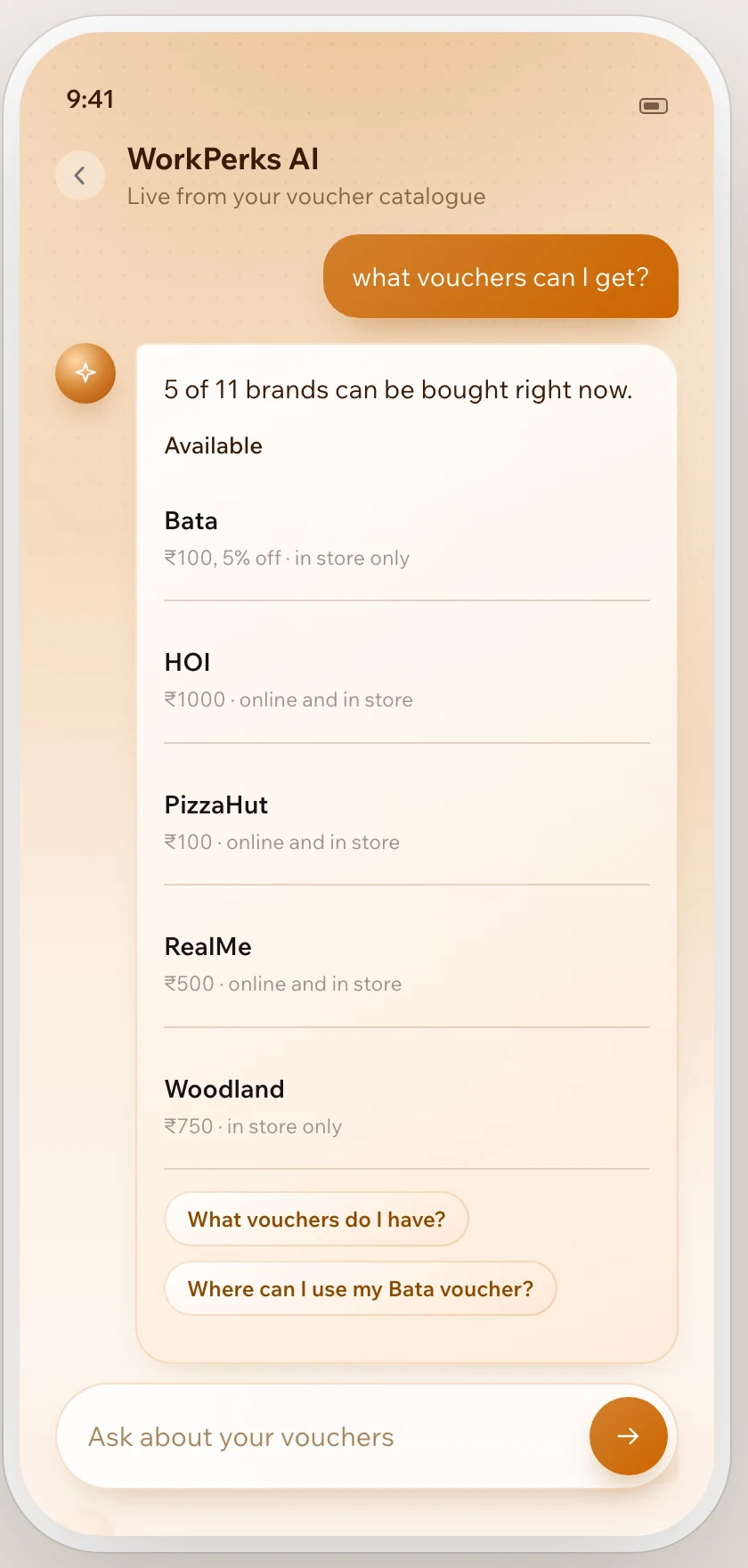
      Yes, Bata is available at price, redeemed where.

      ValueRedeemedIn stock

      Where can I use my Bata voucher?

      Prose lost the facts. Figures now sit in rows, filled live from the supplier, which the AI’s phrasing never touches.

    05How the AI works

    The AI understands. The application decides.

    1. User · conversation

      Can you cancel my gym booking?

      In the employee’s words, sent with what the app already knows: benefits, balances, orders and its screens.

    2. AI router
      cannot_dothing: cancel my gym booking
      screen: orders

      One call. The model reads the sentence and returns the name of a tool. Never a fact.

    3. Tools
      Names what it can’t doand checks the screen exists

      Ordinary code, one per kind of question. Each returns data, or the reason there is none.

    4. Application data · APIs
      Your ordersa screen the app confirmed it has

      The app’s own data, or the voucher supplier’s API through a small proxy.

    5. Response

      I can’t do cancelling your gym booking myself. I can explain anything and take you to where it happens.

      Your orders

      Built by the app, in code. Every button goes to a screen the app confirmed it has.

    In the app the model fills in the tool’s arguments; the ones shown are what this page’s keyword layer produces for the same question.

    Data boundary

    The model doesn’t need to see everything.

    Only the question crosses to the AI, with emails and long digit runs stripped on the server. Balances, orders and voucher codes stay in the app.

    The question goes from the phone to the server, which strips personal details and sends only the question to the AI. Balances, orders and codes never leave the app. Vouchers come from the supplier through a proxy that holds the credentials. Phonethe question Serverstrips emails & numbers AI modelsees the question only Proxyholds the credentials Supplier APIlive vouchers stays in the app:balances · orders · codes

    Thirteen tools

    Find
    search_benefits benefit_detail explain
    Balances
    get_balance get_wallet
    Holdings
    my_orders list_my_vouchers
    Vouchers
    search_vouchers voucher_stores vouchers_near
    The app
    open_screen about_app cannot_do

    When the AI is unavailable

    1. Retry the same modelA rate limit or timeout: it waits as long as the provider asks.
    2. Try the second modelThe first is gone or retired. The same answer, no waiting.
    3. Keyword rulesEvery model failed. A narrower answer, still from live data.
    4. Helpful fallbackLive benefits as rows and a way to browse, never a flat failure.
    06Building the product

    I didn’t hand the design off to engineering. I built the system I was designing.

    The Gym & fitness memberships screen in the employee app, with a Subscribe button.
    Benefit screenWhere “Open Gym & fitness memberships” lands
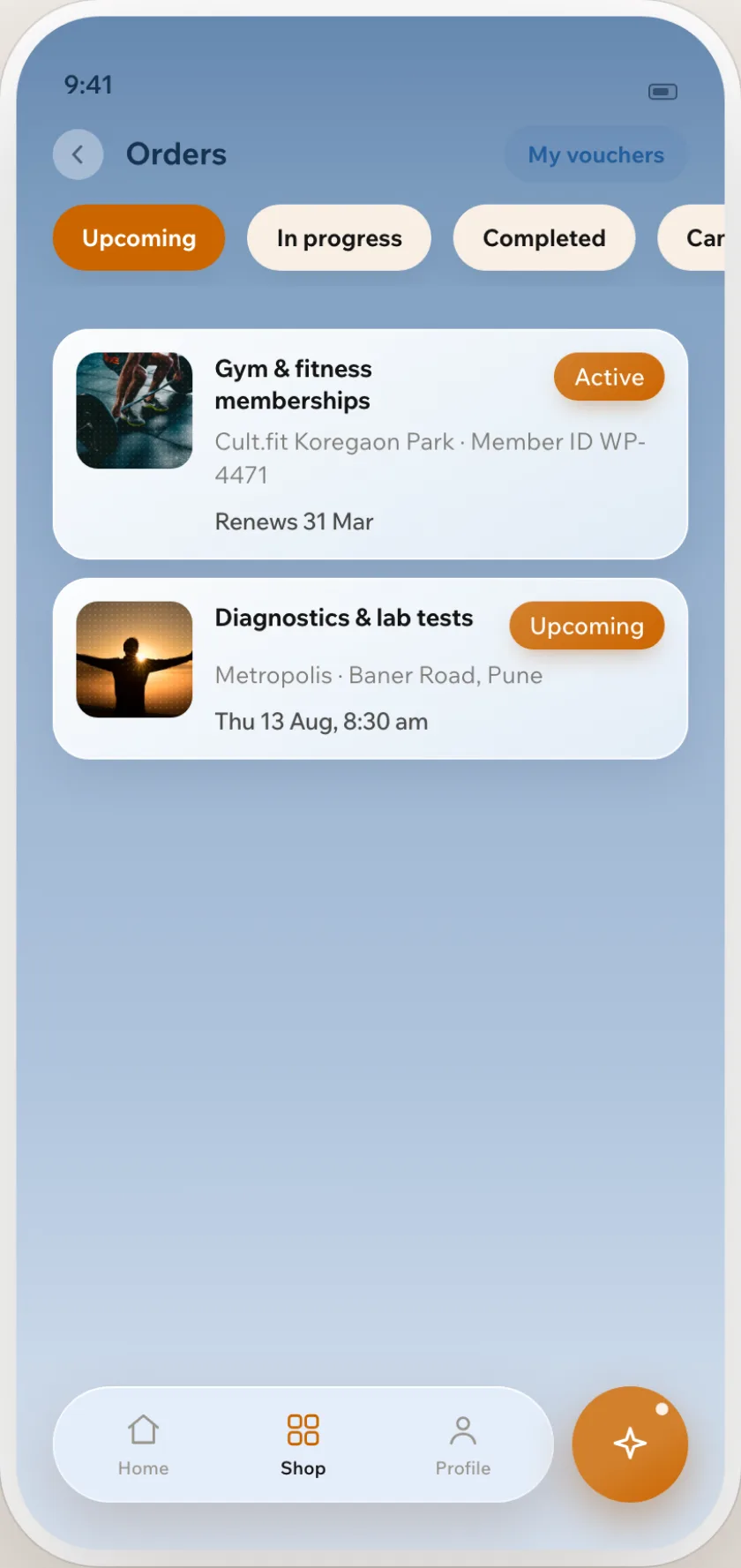
    The Orders screen in the employee app: an active gym membership and an upcoming lab test.
    Orders screenWhere “Your orders” lands
    The voucher answer in the app: brands with their values and stock, read live from the supplier.
    Live vouchersBrands, values and stock, read from the supplier
    1. Design
    2. Prompt
    3. Code
    4. Run
    5. Test
    6. Break
    7. Iterate
    Spec revisions
    3in three weeks, each rewritten against what the live systems returned.
    Tools to build
    18→8The first spec asked for 18. Reading the database first showed ten already existed.
    Defects found
    9by a separate agent auditing the build against the spec.

    What I brought

    The architecture, the rules it cannot break, reading the live schema before specifying against it, and reversing on evidence: the spec had it issuing vouchers, until three of six orders arrived under the wrong brand.

    What Claude Code brought

    The code, from the React screen to the proxy and the test suite, and the documents. A respecification in the morning came back running the same day.

    07What I learned

    What I learned

    1. AI UX is behaviour design.

      The screen was the easy part. The work was deciding what the AI may decide, and how a no still helps.

    2. The model should not own the product’s data or business rules.

      It picks a tool. Facts, rules and refusals belong to the app, so an outage degrades the assistant instead of breaking it.

    3. Building became faster, but verification became more important.

      A respecification ran the same day. Finding out what was actually true did not speed up.

    4. Real systems reveal constraints that static designs cannot.

      Reading the live database first turned a spec for eighteen tools into eight.

    5. AI coding expanded how much of the product I could take ownership of.

      I owned the spec, the architecture, the rules and the bar for accepting a build; Claude Code turned each decision into code.

    From designing the interface to designing the entire product behaviour.

    AI coding didn’t replace the design process for me. It expanded how much of the product I could personally take ownership of.

    08Real-world discoveries

    Reality doesn’t behave like documentation.

    Six supplier behaviours the integration guide doesn’t document, found by running the integration on the account I had access to.

    1. A non-zero code means the order failed.The order was queued, not rejected. Reissuing it buys a second voucher.Poll the status. Never retry.
    2. “Inactive product” means rejected, as the vendor’s catalogue says.It comes back again and again while an order is still settling.Read it as pending.
    3. Orders settle the same way each time.Four took eighty to a hundred seconds. The fifth returned at once.Three states, pending, issued and failed, and keep the order id.
    4. Stock goes down after a purchase.Every brand reported the same stock afterwards.Stock never confirms or fails a purchase.
    5. The brand delivered is the brand ordered.Three of six orders arrived under a different brand.Check, warn with both names, and hand off instead of buying.
    6. Published store addresses are usable.They don’t resolve to real locations.Name the town, never an address.
    09The prototype

    Try the assistant yourself.

    The prototype’s own tools, renderer and catalogue: 35 benefits (27 switched on for this employee), a wallet and eight past orders. The AI can’t run in a static page, so typing is matched by the app’s keyword backup layer.