SPSathyasiddha Pattanaik See it fill
01Case studyBajaj Finserv Health

Generative EMR

An AI assistant added to Bajaj Finserv Health’s EMR, the electronic medical record doctors fill in. Doctors speak, and the form writes itself.
Role
Led the project
Team
2 product designers, 3 product managers
Timeline
3 months, 2025 to 2026 · Live
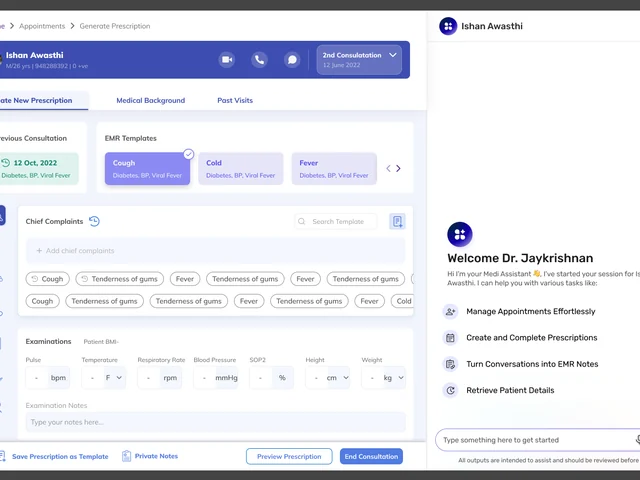
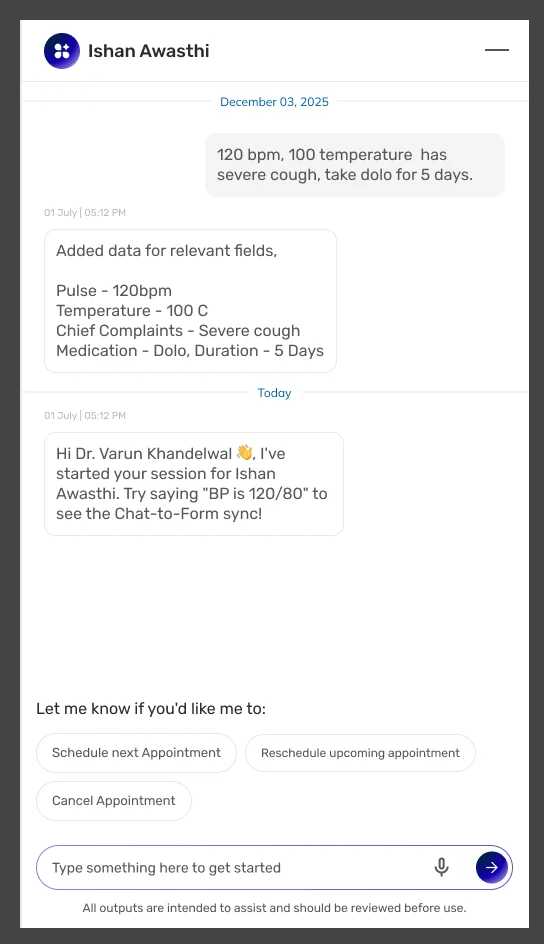
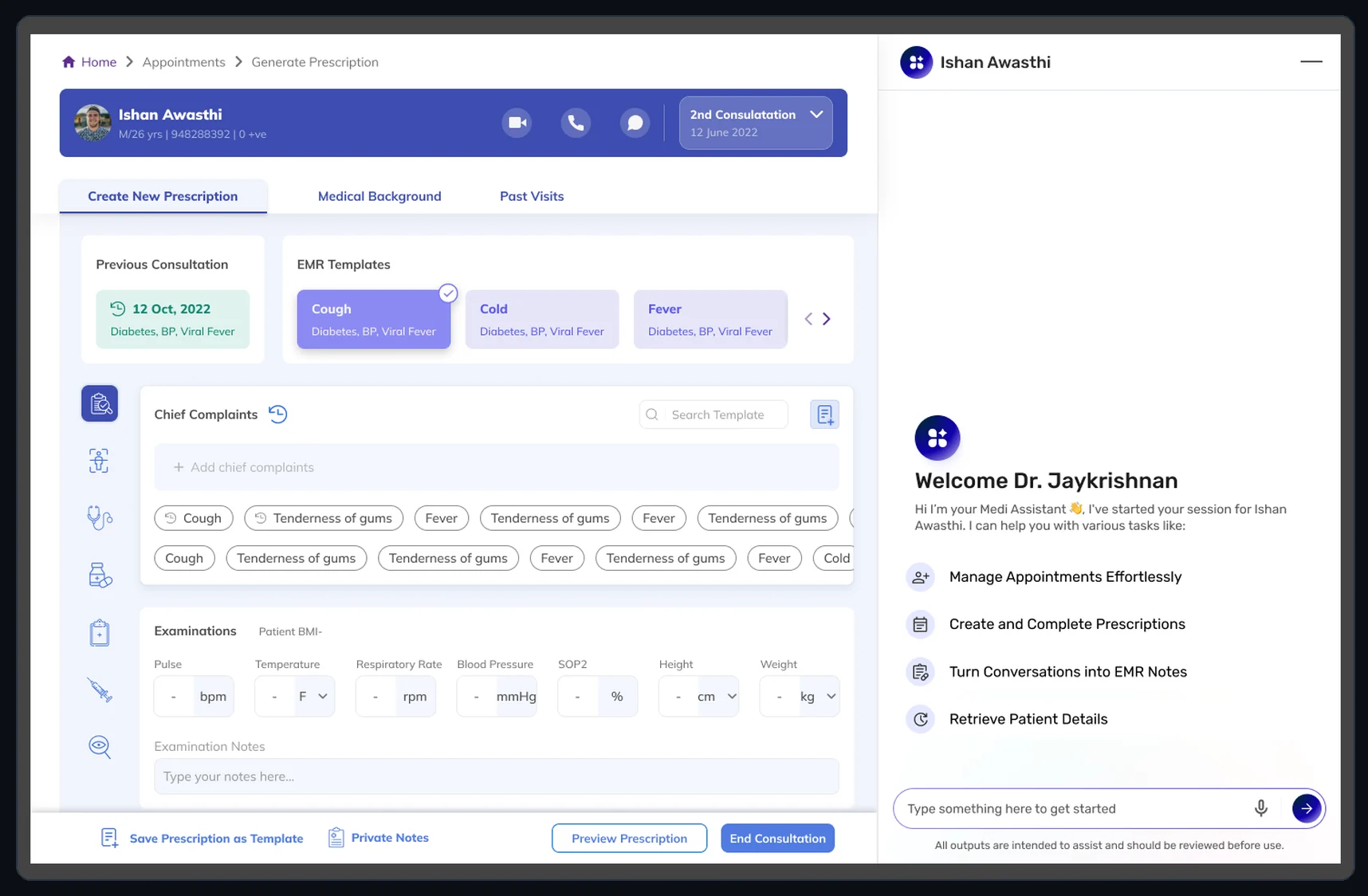
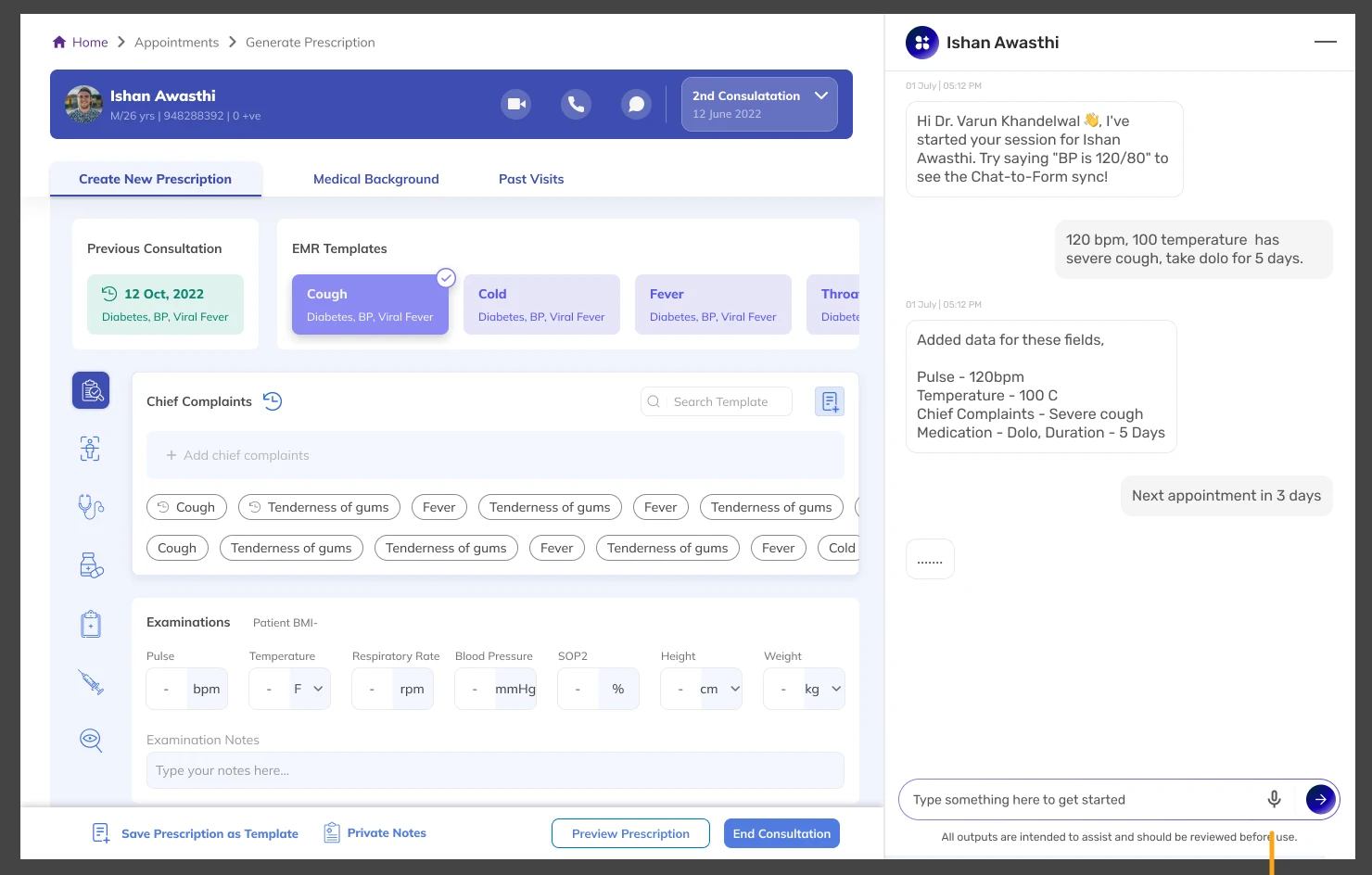
The prescription record for patient Ishan Awasthi, with the assistant docked at the right, welcoming the doctor and listing what it can do. An ongoing consultation: the prescription record on the left, and on the right the assistant thread where the doctor dictated vitals and the assistant listed the fields it filled.
01Product overview

The same medical record, filling in real time as the doctor speaks.

An assistant that sits beside the medical record doctors already use. Doctors type or talk normally, and it fills in the record’s fields as they go. The record stays the same; only the way it gets filled in changes.

  1. SessionThe assistant docked beside the record
  2. ConsultationComplaints, vitals and medication fill in live as the doctor speaks

The existing EMR

Prescriptions generated

7,16,280

From 2,21,728 in 2022, all typed by hand, before speech-to-text.

3.2× · up 223%

The existing EMR

15,798

Unique doctors using it

From 7,160 in 2022. 2.2×, up 121%.

Generative EMR

87

Consultations so far

April to September 2026, June the busiest at 26. Use, not results.

02The problem

Two to three minutes of typing, for every single prescription.

It takes even longer for specialists: a dentist has to mark each tooth on the chart, one by one, before writing a single word.

In most medical record systems, doctors type every detail into fixed fields, during or after the visit. The form itself was fine: the fields were the right ones, and no doctor wanted a different form. What wore them down was typing it all by hand, between patients, all day.

Industry evidence How much of a doctor’s time the record takes

Record time per visit
~36min

A doctor spends about 36 minutes on the record for each patient visit. The visit itself is booked for 30.

Desk time per hour of care
~2hrs

For every hour a doctor spends with patients, nearly two more go to the record and desk work.

Extra work at night
1–2hrs

After the clinic closes, doctors spend another one to two hours on the record each night.

How a clinician’s time is actually spent

More of the day goes to the record than to the patient.

Many doctors say record-keeping is a main reason for burnout and lower job satisfaction.

Sources: per visit, Rotenstein et al., JAMA Network Open, 2023 (median 36.2 minutes against 30-minute booked visits, US primary care). Hour with patients, after hours and the time split, Sinsky et al., Annals of Internal Medicine, 2016 (57 US physicians observed; after-hours from the diaries of 21). Figures are from US studies, not Bajaj Finserv Health.

Typing by handWith the assistant

Rigid fields, typed in by hand. Or one sentence, spoken once.

Chief complaints · Examinations · Diagnosis · Medication · Each typed by hand · During or after the visit

  1. Chief complaintsSpeak
  2. Examinations
  3. Diagnosis
  4. MedicationFields fill
  5. Typed by hand
  6. After the visitRead back

Every field, by hand, between patients, all day.One sentence, spoken once, fills three sections of a form the doctor never opens.

The existing EMR’s own history
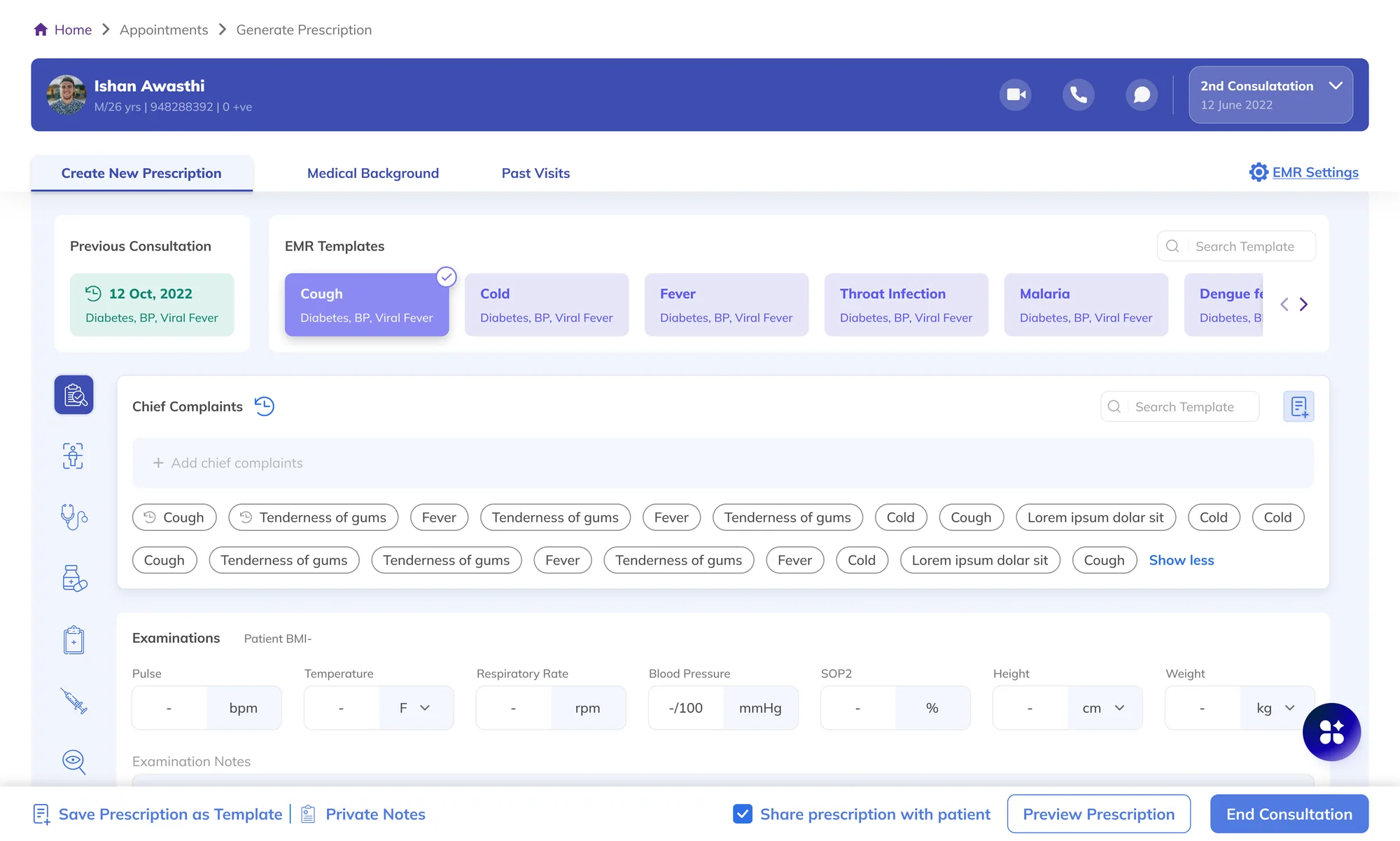
The EMR worked well. At this scale, fixing even small delays made it perform better.

The existing prescription record at Bajaj Finserv Health: patient header, EMR templates, chief complaints, examinations and the footer actions.
Fig. 01The prescription record doctors already used. The round button at the bottom right is the assistant’s entry point.

7,16,280

Prescriptions generated

Up from 2,21,728 in 2022, a 223% rise. Every one typed by hand.

15,798

Unique doctors using it

Up from 7,160 in 2022, a 121% rise.

This growth, all on the typed EMR, is what prompted the project: a base this large meant any time saved per prescription would multiply across thousands of doctors every day.

03Constraints and design principles

The goal was not to redesign the system, but to improve it without disrupting it.

The principle, agreed before any design decision

Improve the record without changing what the record is.

  1. 01 · The system

    An existing technical system

    We were not starting from scratch. The system was already live and built in-house, so any design that could not be built was spotted straight away.

    Led toWorking prototypes, not static screens.

  2. 02 · The doctors

    High-intensity users

    Doctors are short on time and push back on anything that changes how they already work. Even small annoyances make them drop a tool.

    Led toAn assistant that sits beside the record; the doctor never has to click into a field.

  3. 03 · The product

    A core that had to stay put

    Rewriting the structure would solve a problem nobody had, and create one everybody would feel.

    Led toThe pivot away from a standalone platform.

Agreeing on this early ruled out the most ambitious version of the idea, and gave the team a test to check its own work against later. That is exactly what happened.

Get clear early. Check what can be built, fast. Decide using working prototypes.

  1. HypothesisAI can reduce documentation effort.
  2. MapEvery field and step in the current record, and every point where a doctor repeated themselves or switched screens.
  3. BoundTurn those moments into a few clear, limited jobs for the AI.

Three use cases

  1. 01Fill in the record’s fields automatically from what the doctor types or says.
  2. 02Notice when a new symptom or diagnosis needs a new section in the record.
  3. 03Read a doctor’s history and background to produce better templates.

Most tools generate notes. This one generates the record itself.

  1. Traditional EMRs Epic, CernerTrusted, compliantManual, rigid, time-heavy
  2. Enterprise AI scribes Nuance DAXBuilt into large hospital systemsFixed output, hard to adapt
  3. AI scribe startups Abridge, Suki, AugmedixFast, listen in the backgroundWrite notes, not the record itself
  4. General AI assistants LLM-based tools, like ChatGPTGood with languageNo medical structure

A note still has to be read by someone and typed into the fields. That is the very work we wanted to remove; those tools only move it somewhere else.
04How the idea changed

The version that demoed best was the one we dropped.

  1. WhiteboardingStage 1 · Explored
  2. A standalone platformStage 2 · Explored
  3. The reversalStage 3 · Dropped
  4. The generative layerStage 4 · Built
  5. PersonalisationStage 5 · Built
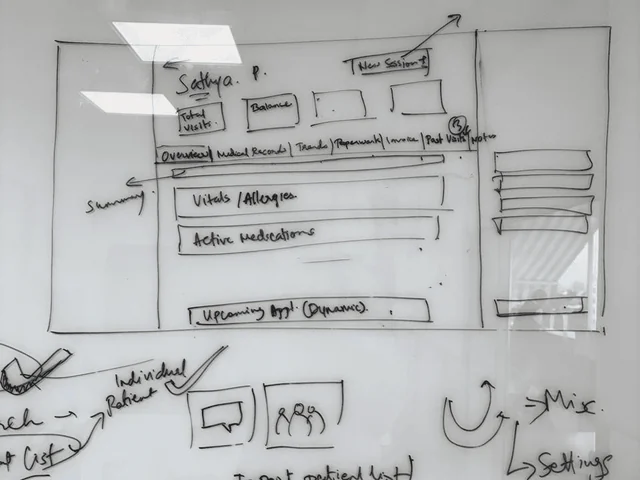
A whiteboard covered in hand-drawn wireframes: chat, patient list, calendar, settings.
Stage 1 · ExploredWhiteboardingChat as the entry point, carrying over the navigation doctors already knew.
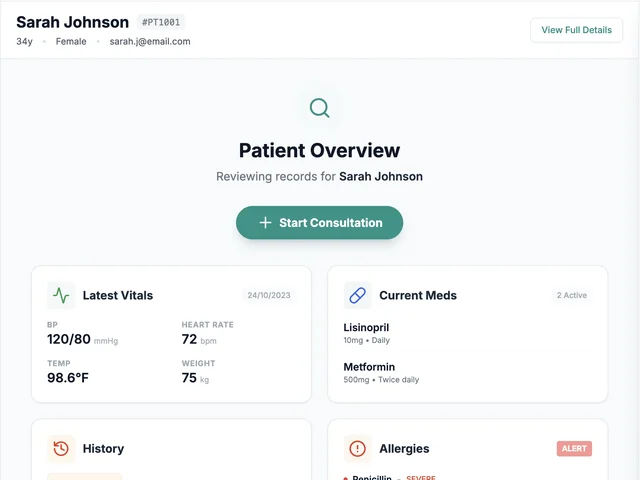
The standalone platform's patient overview: vitals, medications, history and allergies as cards above a Start Consultation button.
Stage 2 · ExploredA standalone platformPatient overview, detailed record, consultation start. Its frontend was built with Google AI Studio. The version that demoed best.

The first answer

A separate app built around chat, on the same database, with tabs copied from the record’s old side menu.

Whiteboarded, then drawn as a full journey covering patient overview, detailed record and consultation start. We used Google AI Studio to build its frontend, so the platform could be clicked through, not just looked at. It looked like the confident version of the idea.

Why it was dropped

It partly went against the principle we had agreed on, improving the system without changing its core, and raised real questions about whether it could be built.

Note what that does not say. Not that it was wrong, or that users rejected it. It was judged not to fit a principle we had agreed on beforehand.
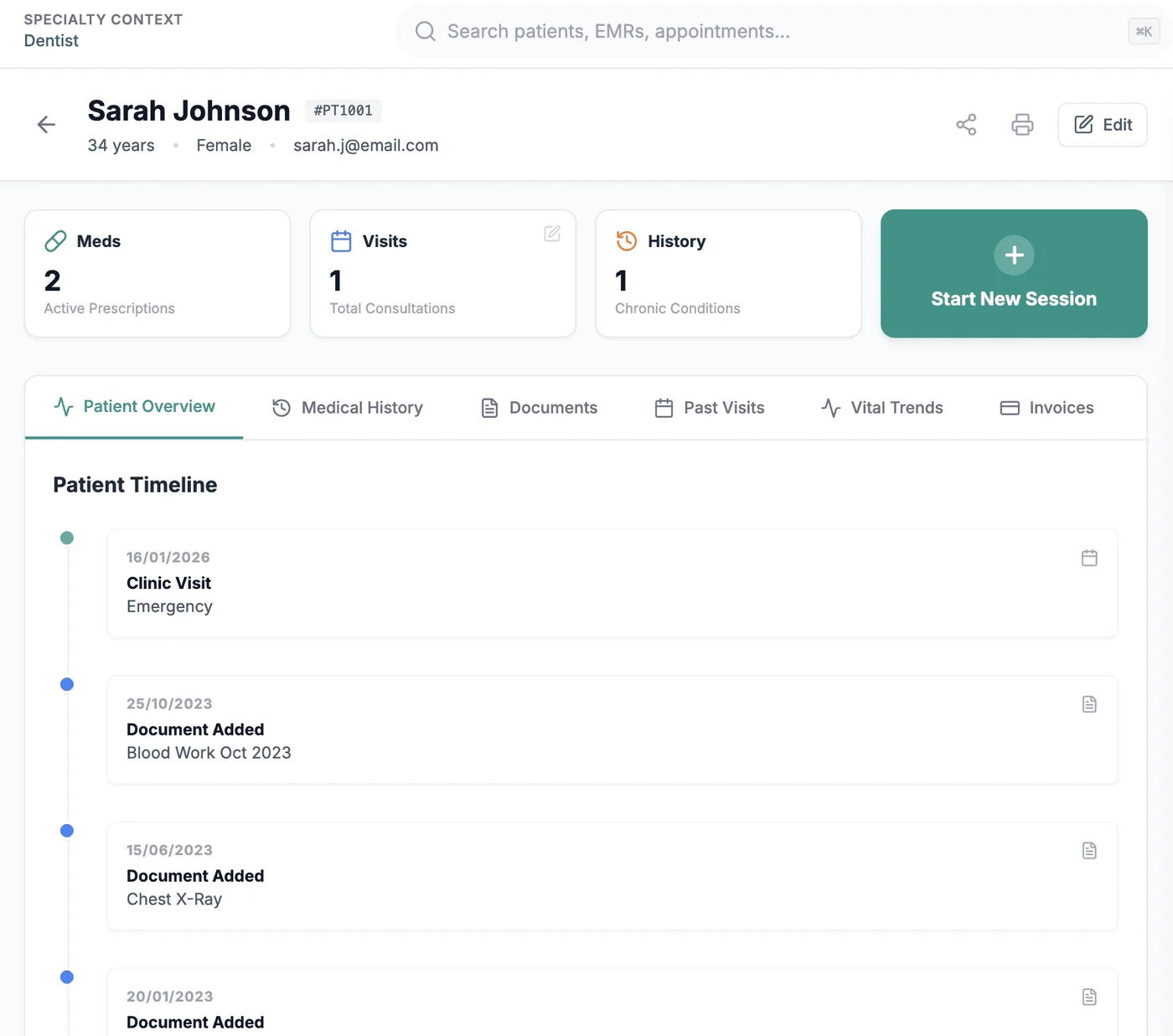
The standalone platform's detailed patient record with a patient timeline, the direction that was dropped.
Stage 3 · DroppedThe reversal: a separate platform replaces the system rather than evolving it.
The existing prescription screen with the assistant docked at the right.
Stage 4 · BuiltThe generative layerTalking or typing fills the form; smart fill also adds details the doctor didn’t mention.
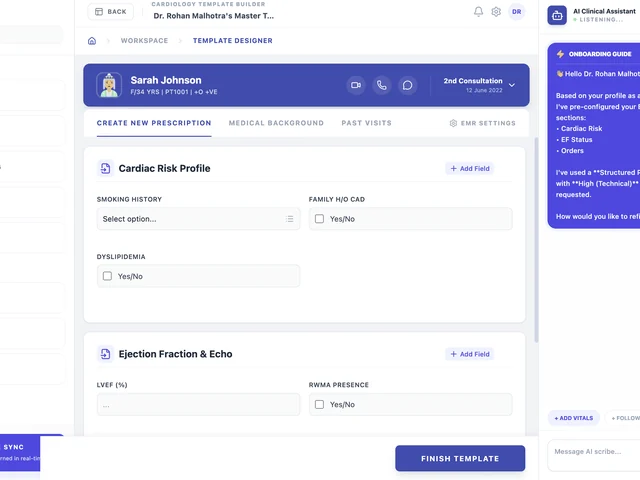
A generated cardiology template: cardiac risk profile and ejection fraction blocks, with the assistant explaining what it pre-configured.
Stage 5 · BuiltPersonalisationOnboarding reads the doctor’s background and generates an editable template.
05Working prototype

Working proofs, not static screens.

Static design screens could not show the AI understanding and adapting, so we built working prototypes instead.

Real-time understanding and a record that fills itself could not be shown in a mockup. The prototype is how the idea was tested, and how we won support for it inside the company.

Google AI Studio
Quick AI experiments and early working versions.
Claude + Cursor
A functioning prototype that behaved like the real record.
  1. The doctor speaksOne natural sentence
  2. Fields fill10 fields across 3 sections
  3. It reads backWhat it added, field by field
  4. The doctor reviewsReviewed before use
Generate Prescription · Ishan AwasthiChat‑to‑Form sync

Ishan Awasthi

M / 26 yrs · O +ve

2nd Consultation12 June 2026

Chief Complaints

Dry cough · 3 daysSore throat · 3 days

Examinations Patient BMI –

Pulse96bpm
Temperature100.4°F
Resp. rate–rpm
Blood pressure128/84mmHg
SpO298%
Height–cm
Weight–kg

Diagnosis

Add Diagnosis

Medication

Prescribed MedicineDolo 650 (Paracetamol 650 mg)
Quantity10 tab
Frequency1-0-1
Duration5 days
TimingAfter food

Ishan Awasthi

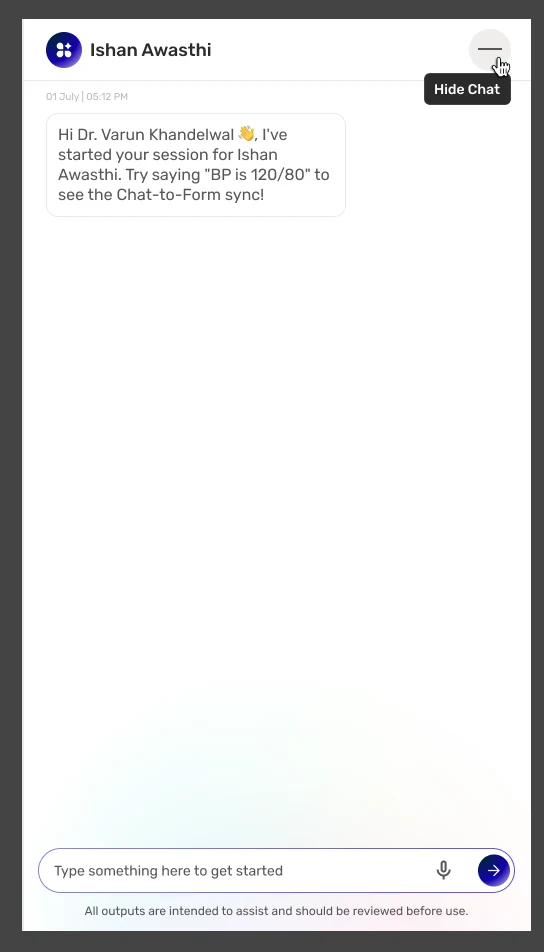
Hi Dr. Varun Khandelwal, I’ve started your session for Ishan Awasthi. Try saying “BP is 120/80” to see the Chat-to-Form sync.
“Temperature 100.4, pulse 96, BP 128 by 84, SpO2 98. Dry cough and sore throat for three days. Start Dolo 650, one tablet twice a day after food, for five days.”
Added data for these fields,
Temperature: 100.4 °F
Pulse: 96 bpm
Blood pressure: 128/84 mmHg
SpO2: 98%
Chief complaints: Dry cough, Sore throat (3 days)
Medication: Dolo 650, 1-0-1, after food, 5 days

All outputs are intended to assist and should be reviewed before use.

1 utterance → 10 fields → 3 sectionsPlays itself while on screen

LiveThe prototype’s core behaviour, running on this page. One sentence, spoken once, fills three sections of a form the doctor never opens. The vitals are illustrative.

06Three key design decisions

The record stays. The typing goes.

  1. The doctor

    “Temperature 100.4, pulse 96, BP 128 by 84…”

    Types or talks normally, in the assistant next to the record.

  2. Decision A · Input
    Voice and chata recording the doctor can replay

    Natural input, captured where the doctor already works.

  3. The layer
    Writes the recordstructured, in real time

    Smart fill adds details the doctor never mentioned.

  4. Decision B · Readback
    Says what it wrotefield by field, reviewed before use

    Never silently populating the form.

  5. Decision C · Shape
    Arrives shapeda template from the doctor’s profile

    Editable by chat, voice or hand.

Decision A
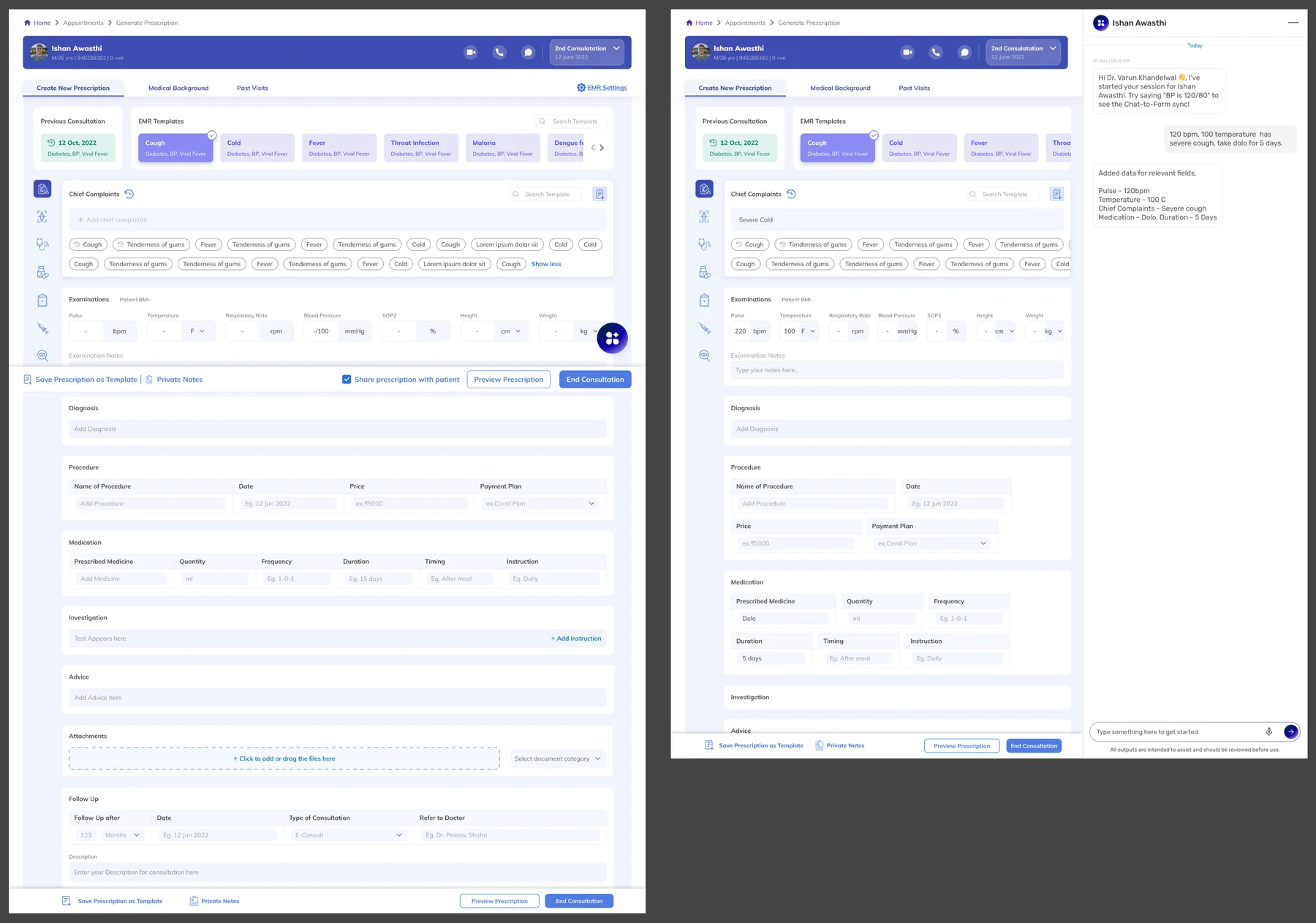
Natural input into structured records.

Two versions of the same full-length prescription record. Left: empty fields, as the doctor had to fill them. Right: the same record populated, with the assistant docked alongside listing what it added.
Fig. 02Left, the record as the doctor had to fill it. Right, the same record, filled from the conversation beside it.
A voice recording waveform with scrub, pause and stop controls, above the standing disclaimer.
Voice inputA recording the doctor can play back and skip through, not just a record button.
Problem
Doctors type every detail into fixed fields, during or after the visit.
Rationale
The record stays as it was; the assistant sits beside it, and the doctor never has to click into a field.
Design
Doctors record the conversation or type, and the record fills itself in from what was said. Smart fill goes a step further and adds sections the doctor didn’t mention.
Value
It changes nothing about the record, and everything about filling it in.

Decision B

It shows what it filled in, and the doctor checks.

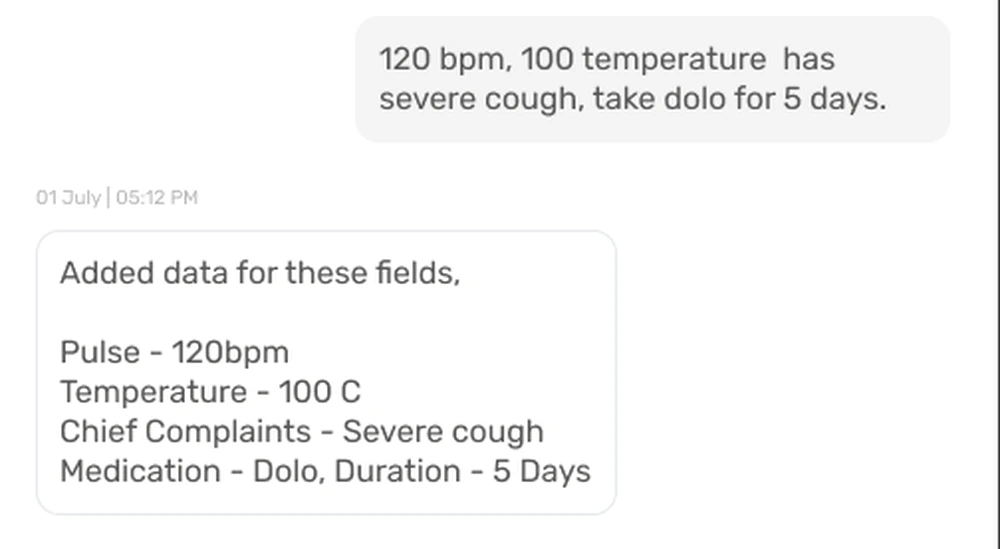
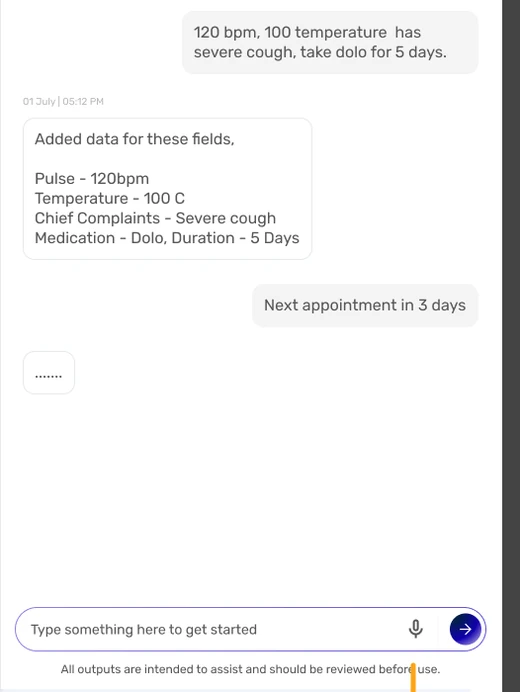
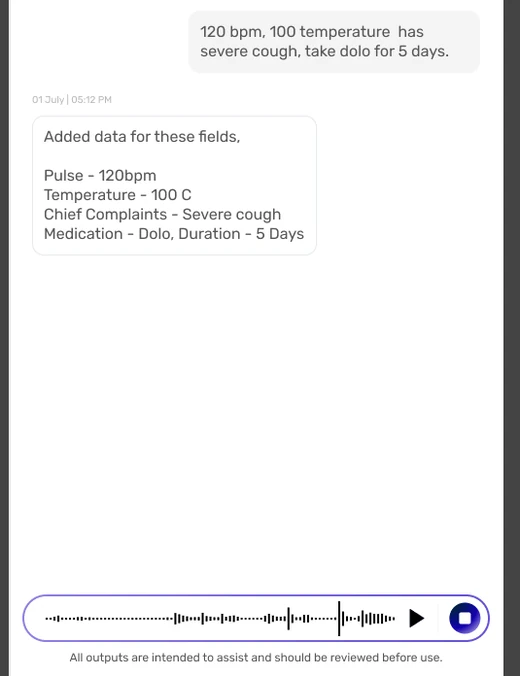
The doctor's dictated sentence, and the assistant's reply listing each field it filled: pulse, temperature, chief complaints, medication and duration.
ReadbackThe dictated sentence, and the assistant’s list of every field it filled.
Problem
The reminder to check AI output only works if doctors can tell what the AI filled in from what they typed.
Rationale
The assistant lists what it wrote, instead of quietly filling the form. The doctor can replay what was said, which matters because the AI wrote into a medical record based on it.
Design
A list of every field it filled, a recording the doctor can replay, and a reminder at the bottom of every assistant screen.
Value
Checking is not a hurdle; it is the product taking its own warning seriously.

All outputs are intended to assist and should be reviewed before use.

Decision C

Personal templates and quick actions.

Could the record arrive already shaped for the person opening it?
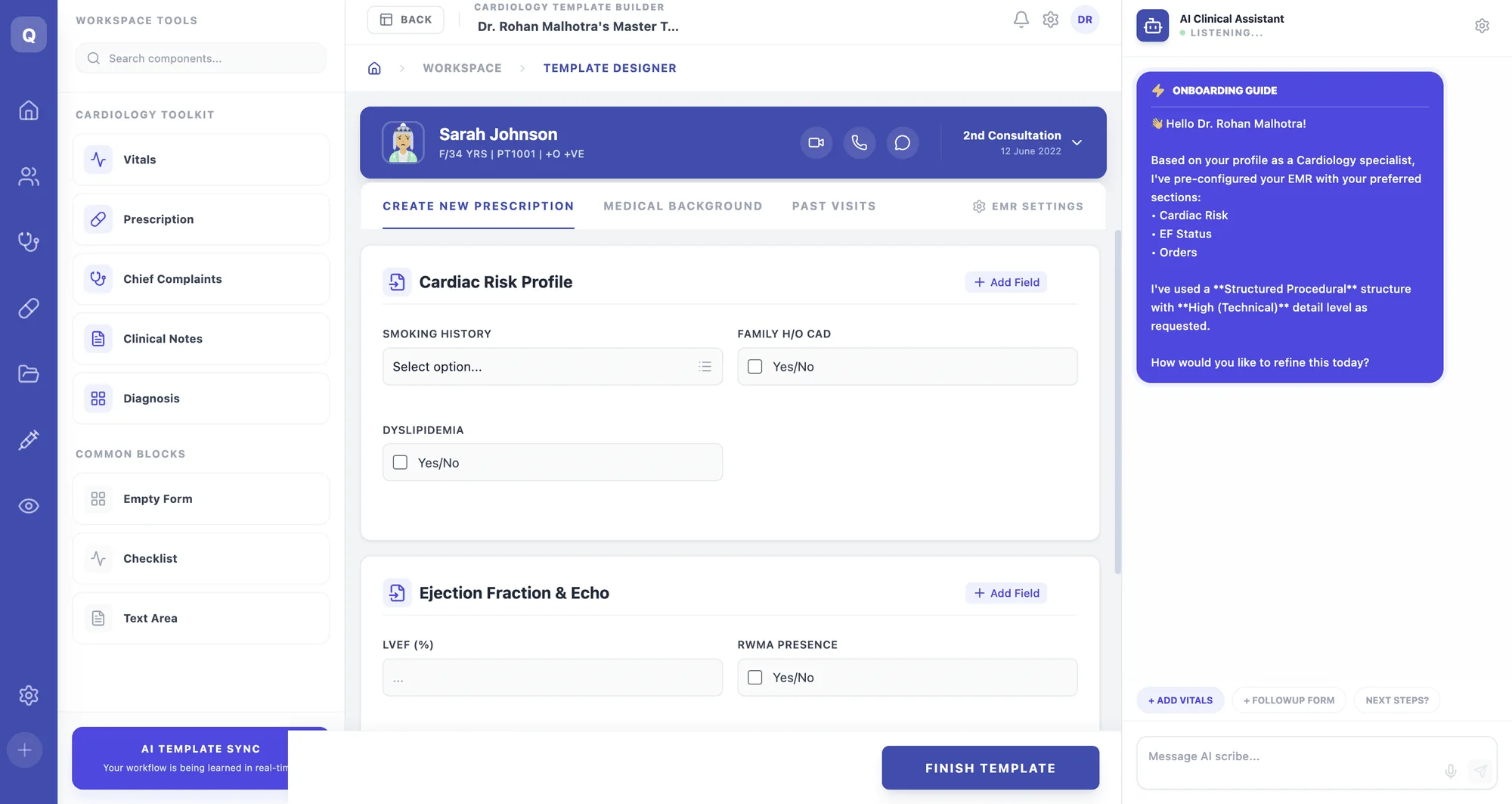
The template designer for a cardiologist: Cardiac Risk Profile and Ejection Fraction and Echo blocks, with the AI clinical assistant's onboarding guide explaining what it pre-configured.
Fig. 03A cardiologist’s first template, generated at onboarding and fully editable.

A cardiologist opens to

Cardiac risk profile
Smoking history, family history of heart disease (CAD), high cholesterol (dyslipidemia).
Ejection fraction and echo
How well the heart pumps (LVEF), and signs of damaged heart muscle (RWMA).

“Based on your profile as a Cardiology specialist, I’ve pre-configured your EMR with your preferred sections.”

The assistant says so. Declared, not silent, and editable by chat, voice or hand.
Problem
The record already shipped with templates for Cough, Cold and Fever, picked by hand from a row of buttons.
Rationale
This does the same job, without the picking.
Design
When a doctor first signs up, it reads their background from the company’s existing doctor database and builds a personal starting template they can fully edit.
Tested
Against four doctors’ data.

A working surface, not a chat window

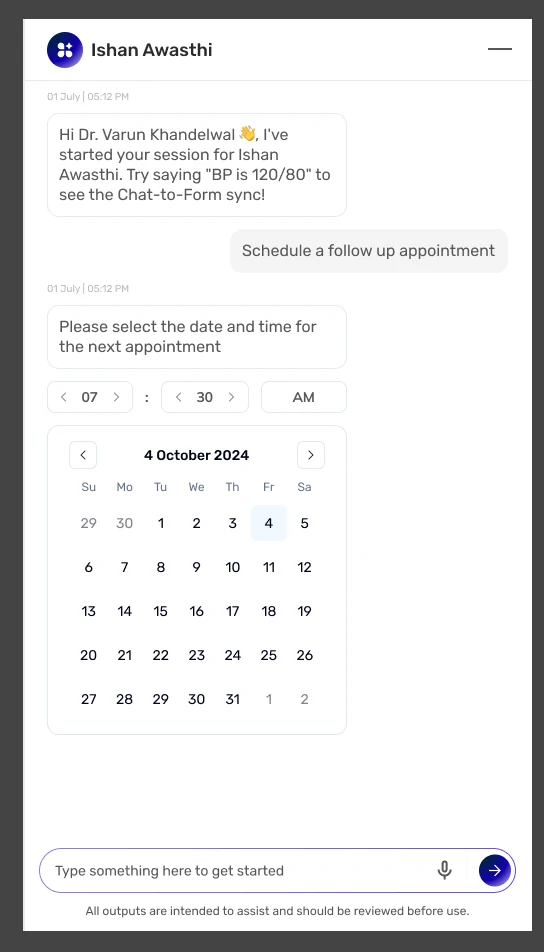
Type “/” to book appointments, pick a date on a calendar inside the chat, tap suggested next steps, and hide the panel to see the whole record.
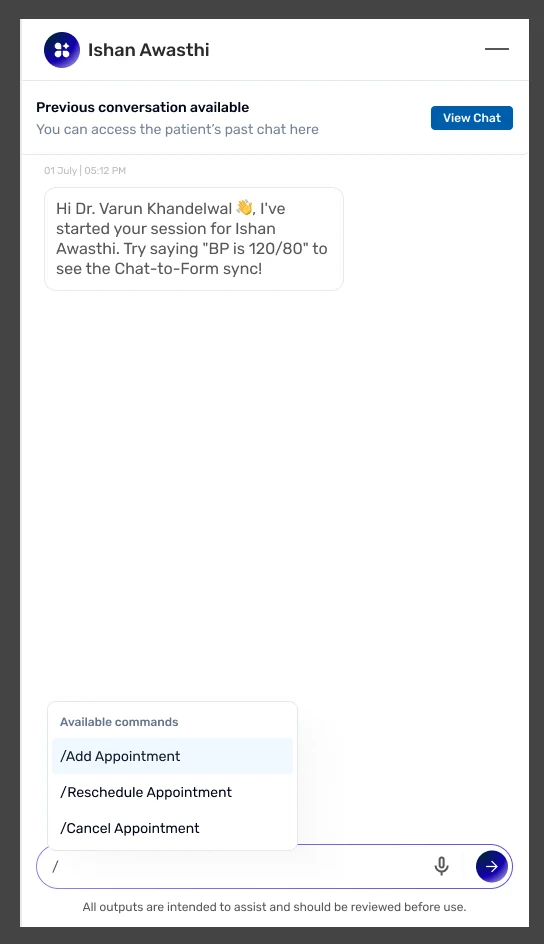
A slash-command menu listing add appointment, reschedule and cancel.
Slash commands
A calendar rendered inline inside the conversation for picking an appointment date.
Scheduling in-thread
Suggested next actions offered beneath the conversation.
Quick actions
The assistant panel collapsing on hover to return the full width to the record.
Hide on hover
07The complete consultation

One consultation, start to finish, in one chat.

In the assistant panel

A welcome that lists what it can do, a voice recording the doctor can replay, a list of every field it filled, booking the next visit in the chat, and a summary to share at the end.

Unchanged in the EMR

Same tabs, same medication table, same examinations row, same footer actions. Nothing in the record changes; the assistant only fills it in.
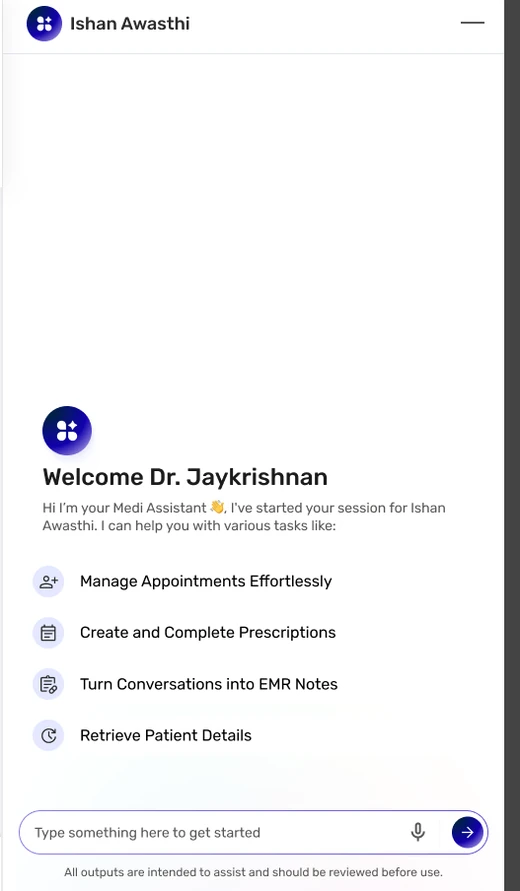
The assistant opens with a welcome and four capabilities: manage appointments, create and complete prescriptions, turn conversations into EMR notes, retrieve patient details.
Voice capture running: a waveform with playback controls beneath the fields the assistant has already written.
The assistant lists the four fields it wrote, and the doctor sets the next appointment in the same chat.
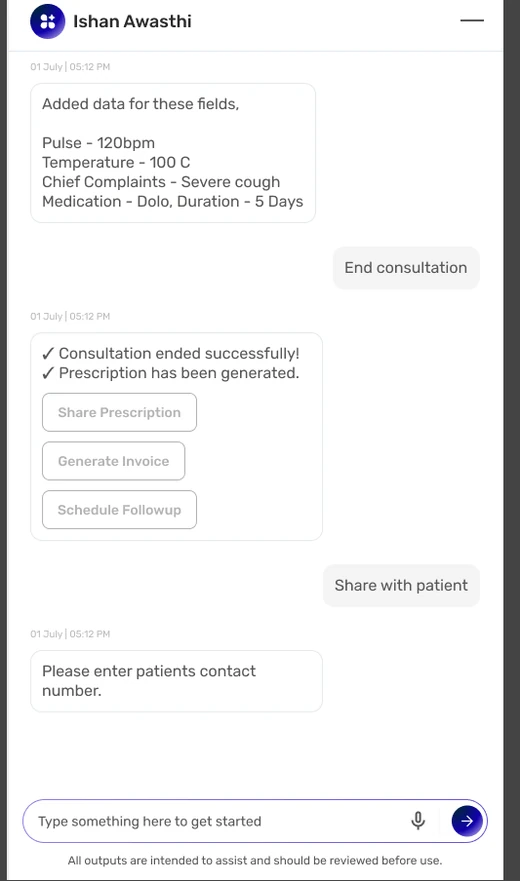
Consultation ended successfully, prescription generated, with share, invoice and follow-up offered.
  1. 01

    Session opens

    The assistant opens with four capabilities: manage appointments, create and complete prescriptions, turn conversations into EMR notes, retrieve patient details.

  2. 02

    Doctor speaks

    Voice capture running, beneath the fields the assistant has already written.

  3. 03

    Record fills, then the next visit

    The assistant lists the fields it wrote, and the doctor sets the next appointment in the same chat.

  4. 04

    Consultation ends

    Prescription generated, with share, invoice and follow-up offered.

Decision
Nothing requires leaving the conversation. Recording, booking, the summary and sharing all happen in one chat.
Achieved
A consultation is documented, scheduled and shared from a single chat.
08From prototype to live product

The feature is live. Getting there took longer than the design did.

For a while the feature was finished but could not be released.

The prototype ran against an existing database, but connecting it to the company’s full-scale doctor database needed engineering skills the team did not have.
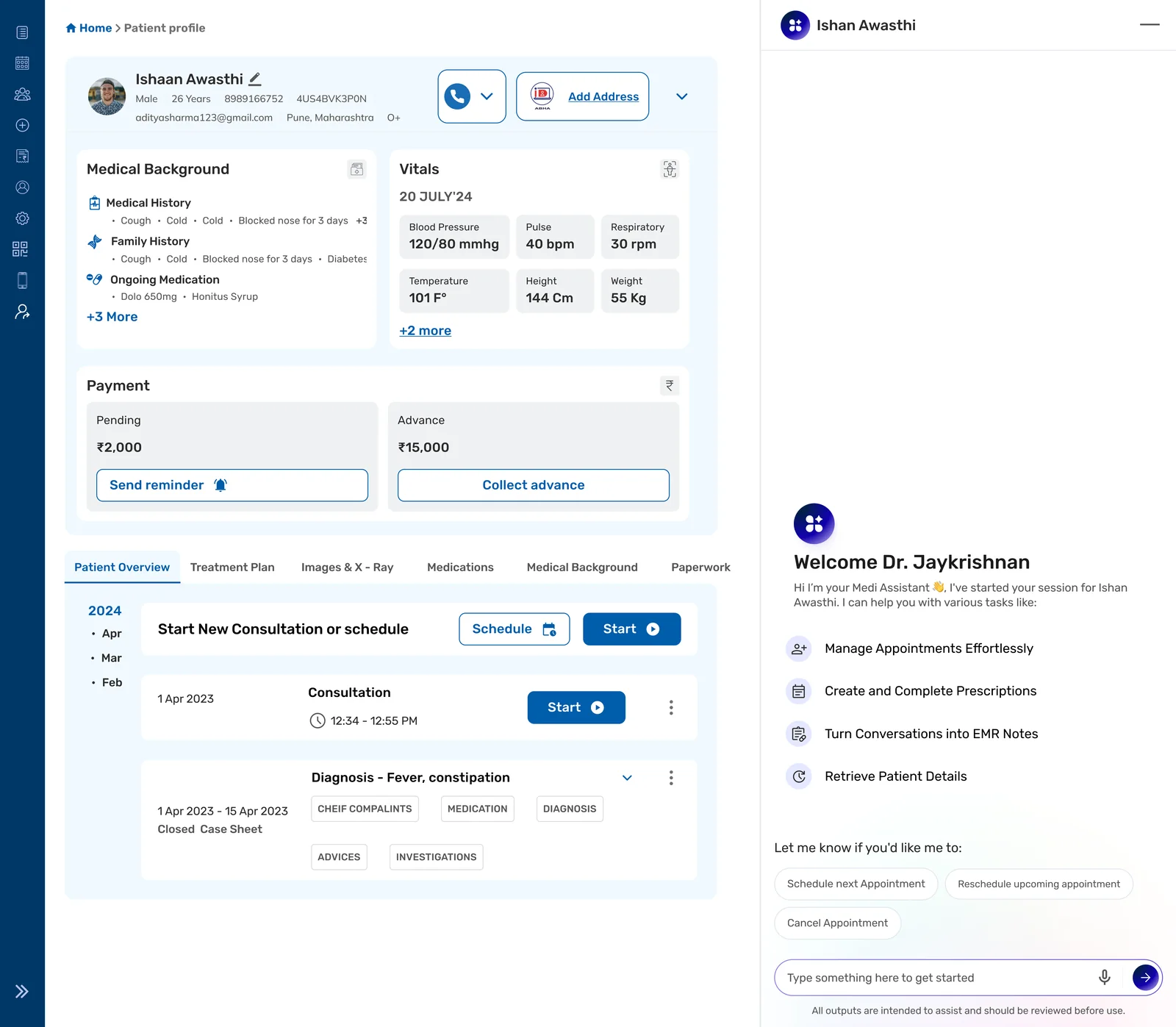
The patient profile for Ishaan Awasthi, with medical background, vitals and payment, and the assistant open at the right.
Fig. 04Patient profile, with the assistant open.

Measured Usage, from the product dashboard

How many consultations ran on Generative EMR, April to September 2026. It shows use, not results.

Not yet measured

Whether documentation time falls, and how many prescriptions are made by talking instead of typing. Both are in What comes next.

Consultations on Generative EMR

Apr to Sep 2026

Total
87
Busiest month
26 June
  1. Apr 2026: 9 consultations
  2. May 2026: 18 consultations
  3. Jun 2026: 26 consultations
  4. Jul 2026: 21 consultations
  5. Aug 2026: 8 consultations
  6. Sep 2026: 5 consultations

From the product dashboard, 23 September 2026. September counts to the 23rd.

09What I learned

Three things this project settled about designing for AI.

  1. On prototyping AIIntelligence cannot be drawn, only run.

    A static screen can claim the system understood. It cannot show it understanding. On AI work the prototype is the design, not a picture of it.

  2. On adding to an enterprise productThe shift was structural, not cosmetic.

    The gain came from changing how information gets into the record, not from redrawing it. Every screen we left alone was part of the result.

  3. On constraintsWrite the constraint down before the work.

    One sentence, agreed in advance, is what let us kill our own best-looking direction. A principle only works if it exists before the thing it has to judge.

10What comes next

The measures that matter.

  1. 01What share of prescriptions get generated through conversation rather than typing.
  2. 02Whether the time from patient to completed record actually falls.

Both are still to be measured. The usage above is the only evidence so far.

Keep the structure clinicians already rely on. Rethink how information gets into it.